


EcoNet
4.04.95K Reviews
App Specs
- Version
- 6.17.0-10941-0de1f09
- Updated On
- License
- Free
- Downloads
- 100,000+
- Developer
- Rheem Manufacturing
- Categories
- House & Home
- Platform
- Android
Screenshots
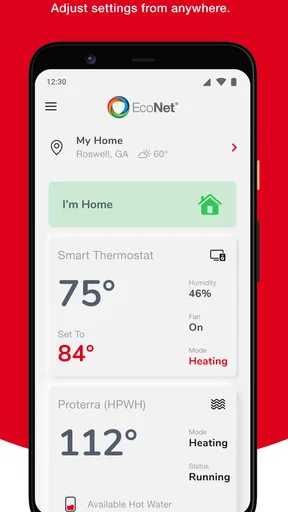
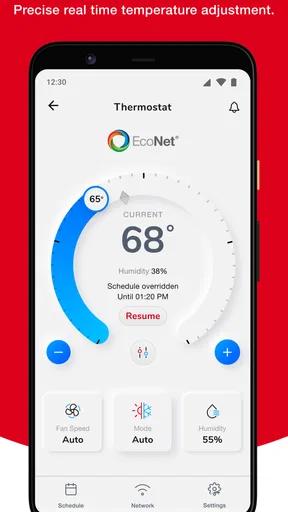
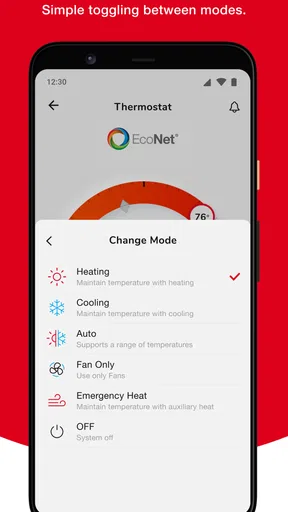
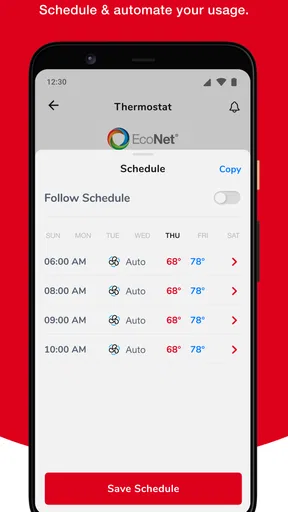
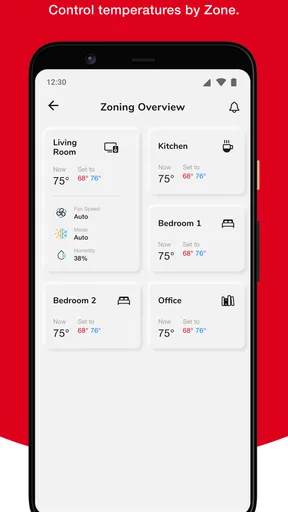
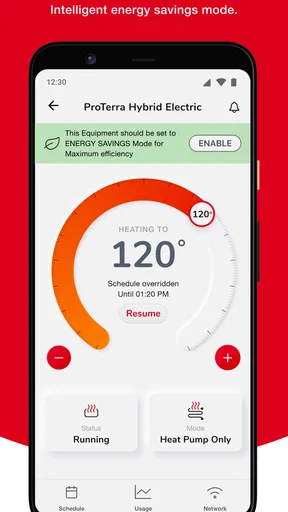
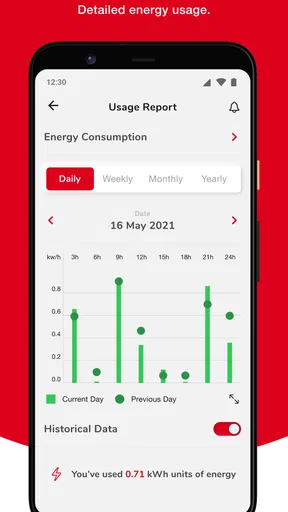
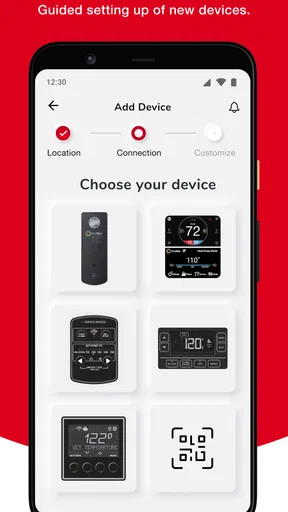
 Analysis by AppCompare
If you’re considering EcoNet, the first thing I’d keep in mind is what it is actually built to control: compatible Rheem-brand heating, cooling, and water-heating equipment. That focus makes it a very different proposition from a general home-energy tracker or a broad sustainability community. In my view, it earns a place on a phone when you already have the right equipment and expect to check or adjust it regularly; without that connection, the app has little reason to become part of your routine.
The first-week appeal is practical, not flashy
In the first few days, the attraction is straightforward: put useful controls for home comfort and hot water in one mobile app instead of relying only on the equipment’s local controls. EcoNet is a free House & Home app from Rheem Manufacturing, intended for consumers managing Rheem-brand HVAC and water heaters. Its average rating is 4.0 from around 11,000 ratings, and it has more than 100,000 installs. Those figures suggest a real user base, though they don’t guarantee that every household’s setup will feel equally smooth.
The important first step is checking compatibility before expecting a particular control to appear. The app’s purpose is tied to Rheem equipment, so it is not a universal remote for every thermostat, furnace, air conditioner, or water heater in a home. If your household uses a mix of brands, EcoNet may cover only part of the system. That distinction matters: a single app can feel wonderfully convenient when it handles the equipment you rely on, but less useful if you still need other manufacturer apps for the rest.
A realistic first-week use is modest. You might open it when leaving home, returning to a changed schedule, or wanting to check the status of a connected heating or cooling system without walking to its controls. A water heater can be part of the same home-management picture, which is useful for households that otherwise treat heating and hot water as unrelated tasks. I’d start by trying the everyday actions you actually need rather than exploring every screen at once. That quickly shows whether it saves effort in your particular home.
Month-to-month value depends on a repeatable habit
Smart controls are most useful when they solve a recurring annoyance. If you routinely want to check or change your Rheem system while away from its control, opening EcoNet can become a small but worthwhile habit. If you only use the app once during setup and then forget it, the phone interface is unlikely to change much about your household routine. For me, that is the honest test of lasting value: does it make a regular decision easier, or does it merely make the equipment seem more modern for a week?
One practical approach is to choose a specific moment to check it, such as before leaving for a trip or when the household’s schedule changes. That keeps the app from becoming another source of constant tinkering. It also helps distinguish a useful adjustment from a change made simply because remote controls are available. For a household with shared responsibilities, agreeing on who is allowed to adjust the system can prevent one person’s comfort setting from surprising everyone else.
Compared with a standard wall control, the main potential advantage is access from the phone rather than having to be beside the equipment or thermostat. Compared with a general smart-home dashboard, EcoNet’s value is its direct focus on Rheem HVAC and water-heating equipment. The trade-off is that it is not the natural choice for someone seeking one brand-neutral app to manage a varied collection of devices. I would choose the manufacturer’s app when the equipment-specific controls are the priority, and a broader home platform only when managing multiple brands together matters more.
Worth Reading Before You Choose

EA SPORTS FC Mobile 26 Is a Bigger Football Game, but It Takes Time

Flipboard Shows What News Apps Must Do Beyond the Feed

Switching to Android Auto Means Rethinking Your Driving Routine

Google Calendar Makes a Crowded Week Easier to Manage

Ludo King Makes the Most of the Minutes Between Plans

Baby Panda World Brings Quick Play to Modern Phones, but Its Game Library Feels Busy
Maintenance is less about the app and more about the system
EcoNet can help you interact with connected equipment, but an app should not be mistaken for a substitute for looking after the equipment itself. I would still pay attention to the unit’s physical condition, follow the manufacturer’s care guidance, and contact a qualified professional when a problem needs hands-on diagnosis. A phone control may make routine management more convenient; it cannot make every heating, cooling, or water-heating issue something a screen can resolve.
There is also a useful household habit here: when something seems wrong, note what changed and when, rather than repeatedly adjusting settings in the hope that the issue disappears. That gives you a clearer account of the situation if you need help later. For a shared home, keeping settings consistent is another form of maintenance. Frequent adjustments by different people can make it difficult to tell whether a system is behaving unusually or simply responding to conflicting preferences.
Before relying on remote access as part of a routine, I’d test it while at home. Confirm that the equipment you care about is represented, that the control you expect is available, and that the change you make has the intended effect. Then try the same task away from home when it is convenient, rather than discovering during a time-sensitive situation that the app is not set up as you assumed. This is a small, non-obvious precaution that can prevent a lot of frustration.
Where convenience can turn into fatigue
Any home-control app can become noise if it prompts you to check the system without a clear reason. If notifications or frequent adjustments start to feel like chores, I’d pare the routine back to the checks that genuinely help. The goal is not to monitor heating or hot water every hour; it is to make a useful change when your household’s needs call for one. A phone can make control easier, but that ease can also tempt people to keep changing settings unnecessarily.
Another source of friction is having equipment from more than one manufacturer. EcoNet’s focused approach is a strength when your Rheem system is the part you want to manage, but it can mean switching apps for other devices. If that is already irritating in your home, a manufacturer-neutral smart-home setup may suit you better, provided it supports the equipment and controls you need. I would not choose an app on the promise of a single dashboard unless it actually covers the devices that matter to you.
It is also worth being clear about who should skip it. If you do not own compatible Rheem equipment, want a general guide to lowering your carbon footprint, or need one app to control a collection of unrelated brands, EcoNet is not aimed at that job. It is best for people who want convenient mobile access to supported home comfort and water-heating equipment, and who will use that access more than once in a while. That narrow fit is not a flaw, but it does make compatibility the deciding question.
What is EcoNet?
EcoNet is essentially your pocket-sized guide to sustainable living, encouraging users to make small, actionable changes that collectively lead to a significant impact on the environment. The app offers a variety of features that cater to both eco-beginners and seasoned green warriors, making it versatile and accessible. In practice, though, I would describe its role more specifically: it is a control app for Rheem-brand HVAC and water heaters, not a general sustainability guide. Being precise about that purpose helps set realistic expectations before you install it.
Features That Stand Out
One of the coolest features of EcoNet is its personalized sustainability goals. The app starts by asking you a few questions about your current lifestyle and preferences. From there, it crafts a tailored plan that’s both achievable and impactful. It's like having a personal eco-coach right in your pocket! For EcoNet, the more useful way to judge personalization is whether the controls available for your connected equipment match the decisions you actually make at home. I would not assume that every Rheem setup presents identical options.
Another awesome feature is the community aspect. You can connect with like-minded individuals, share tips, and even participate in challenges. The sense of camaraderie is palpable, and it's genuinely inspiring to see people rally together for a common cause. Still, if you are installing the app mainly to operate home equipment, I would focus first on whether its equipment controls fit your routine. A community or challenge is not a substitute for compatibility, and it should not be the reason to expect features unrelated to Rheem devices.
EcoNet also offers a robust resource library filled with articles, videos, and tips on everything from composting to reducing plastic use. It’s like having an encyclopedia of eco-friendly knowledge at your fingertips. For a homeowner comparing options, the more useful distinction is that EcoNet is designed around Rheem equipment rather than being a broad home-energy reference tool. I would treat any educational material as secondary to the central question: can it help you manage the heating, cooling, or water-heating equipment you own?
How User-Friendly is It?
Let’s be real—no one wants to wrestle with complicated interfaces, especially when trying to do some good in the world. Thankfully, EcoNet is incredibly intuitive. The design is clean, the navigation is straightforward, and the information is well-organized. Even if you’re not particularly tech-savvy, you’ll find yourself breezing through the app without a hitch. In a home-control setting, ease also means being able to find the specific equipment you need without guessing. I’d take a few minutes to learn where its main controls are before relying on them in a hurry.
The app also features push notifications that gently remind you of your goals and provide helpful tips. It’s like having a little eco-angel on your shoulder, keeping you motivated and informed. For a practical routine, I would keep alerts purposeful: a reminder is valuable when it draws attention to something you need to act on, but less so if it encourages checking the app out of habit. Whether notifications feel helpful will depend on how often you want your home equipment to prompt you.
Does It Really Make a Difference?
The big question, of course, is whether using EcoNet actually makes a difference. Based on my experience and the feedback from the community, the answer is a resounding yes. The app helps you track your progress, and seeing those little wins can be incredibly rewarding. Plus, the positive reinforcement from the community can be just the boost you need to keep going. For a household app, I would measure a difference in terms of practical control and a routine that suits the people living there, rather than assuming that installing it alone changes energy use.
Moreover, EcoNet has partnered with various environmental organizations, ensuring that your efforts contribute to larger, global initiatives. So, every small action you take has a ripple effect that extends far beyond your immediate circle. I would still keep the day-to-day decision grounded in your equipment and household needs: adjust settings thoughtfully, avoid treating a remote control as a reason for constant changes, and use professional help when the issue is beyond an app’s reach.
Final Thoughts
In a world where climate change feels like an insurmountable challenge, EcoNet offers a glimmer of hope. It empowers individuals to make a difference, one step at a time. Whether you’re a seasoned environmentalist or just starting your green journey, this app is a fantastic tool to have in your arsenal. More specifically, its lasting appeal comes down to whether you have supported Rheem equipment and value managing it from your phone. It is free, rated for Everyone, and its current version is 6.16.2-10671-0b6c482; the app first appeared on June 2, 2014. Those details are less important than whether it continues to solve a real problem in your home.
If you’re ready to take action and join a community of change-makers, give EcoNet a try. It’s more than just an app; it’s a movement towards a more sustainable future. I’d recommend it most to Rheem owners who want convenient access to their connected HVAC or water heater and are willing to build a simple, sensible habit around it. If you need broad brand coverage, a general eco-living coach, or a replacement for equipment maintenance, choose a tool or service designed for that need instead. EcoNet earns lasting space when it saves you a trip to the controls or makes a recurring home task easier—not simply because it is new.
Pros
- User-friendly interface for easy navigation.
- Offers real-time environmental data updates.
- Customizable notifications for alerts.
- Supports multiple languages for accessibility.
- Integrates well with smart home devices.
Cons
- Limited offline functionality.
- Some features require premium subscription.
- Occasional app crashes reported by users.
- Heavy battery usage on older devices.
- Limited support for rural area data.
FAQs for EcoNet
What is EcoNet and how does it work?
EcoNet is a sustainability-focused app designed to help users track and reduce their carbon footprint. It uses data inputs about daily activities, such as transportation, energy use, and waste, to calculate your environmental impact. The app then offers personalized tips and challenges to help you adopt more eco-friendly habits.
Is EcoNet free to use, or does it require a subscription?
EcoNet offers a free version with basic features, allowing users to track their carbon footprint and access general tips for reducing it. For more advanced features, such as personalized challenges, detailed analytics, and community support, a subscription plan is available. Pricing details can be found within the app or on their official website.
What kind of data does EcoNet collect, and is my privacy protected?
EcoNet collects data related to your daily activities, such as travel, energy consumption, and waste management. The app prioritizes user privacy by employing data encryption and strict privacy policies, ensuring your information is secure and used solely for improving your experience and providing personalized recommendations.
Can EcoNet be integrated with other apps or devices?
Yes, EcoNet can integrate with various fitness trackers and smart home devices to provide a more comprehensive analysis of your carbon footprint. By syncing with these devices, the app can automatically gather relevant data, offering a seamless and accurate tracking experience without the need for manual input.
Does EcoNet support multiple languages and regions?
EcoNet is designed to be accessible to a global audience, offering support for multiple languages and region-specific data. This ensures that tips and recommendations are relevant and applicable to your local context, helping you make more informed and effective lifestyle changes.


